For this part of the project I tested the final product. Some of the desired functions where not realised in the final result, but it is key to test the results in order to get a good working app with the functionality it does have. In order for the final users to really use the app I have to ofcourse test the app. For this part I like to thank my girlfriend and mom for helping me with this. They gave my insights of things I already knew but also of things I didn’t really pay attention to or just forgot.
The test users did a few actions I asked them to do. They gave answer on some functional questions when performing these actions. In the end I ask the user what they found of my app and where the might want to see some improvement. Per user there has been indicated on what kind of level they are experienced with apps, mobile phones and that kind of technologies.
Tester one (Nurse student) Good experience with technology
Register a new account: Succeeded – (notifications work fine, she didn’t used a correct email, but she renamed it).
Send insights: Succeeded – She noticed that she could send an insight via the indicated button on the home screen. She also saw which email adres to use to send the insight too. The link to microsoft outlook also was clear for her, she could have logged into to her email adres, but for testing purposes she didn’t).
Go to topics: Succeeded – She could find the topic list. She used the toolbar in order to get to the topics. She noticed when opening a topic she could open the reply option. The reply option isn’t coded yet.
Make a topic: Succeeded – She could find the make a topic button on the topic page. When making a topic she could fill in everything except the choose a date & time button, this part of the form doesn’t work the way it has to. Date & time doesn’t indicate which date has been chosen. It stays blank. The text “date and time” isn’t written the right way (data instead of date).
The topic that has been made: Wrong – The topic isn’t ordered the right way. The user immediately noticed that her newly made topic is stored all the way down in the topic list. This causes the topic not to be featured in the home page. The topic also doesn’t show the picture that was used for the making of the topic.
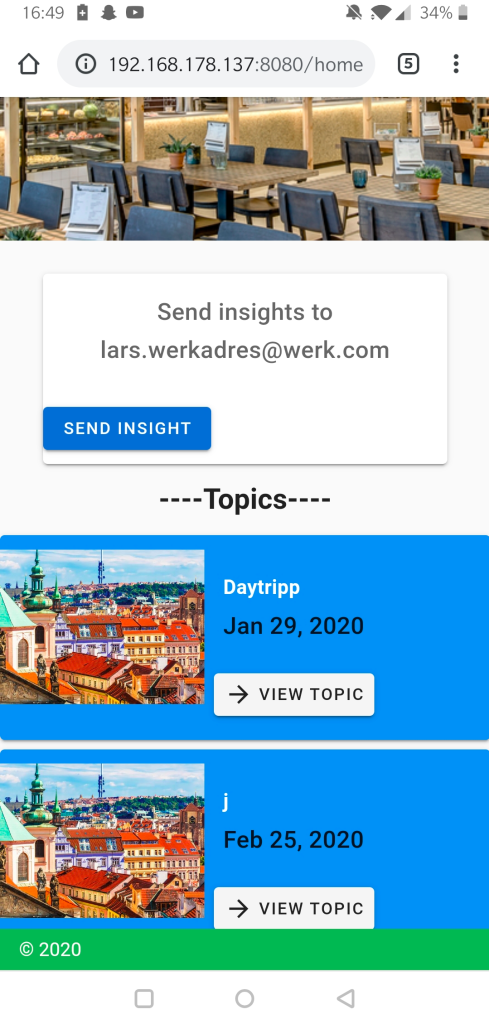
Change name and date of the topic: Succeeded – She could change the name and topic but she noted that she wanted to change the picture if that would be possible.
Has something happend last month: Succeeded – She could find the events page in the toolbar and saw that one of her colleges has put a topic in. She noticed that there wasn’t any feedback of the events on the homepage.
Can you delete the old event and make a new one: Succeeded – She can delete the old event and the new event is displayed. This stays when I asked her to refresh the page.
Do you have any other feedback on the app?: She noticed that the button “insight view” does bring her to the topic page (this is because I was testing to use firebase for the sending of insights). And last she noticed that she couldn’t open the settings page.
Aanpassingen
- Insight view deleted from toolbar
- Settings deleted from toolbar
- “data” change to “date” in created topic part of the app
- pictures are back
- Made the topics add from top to bottom
To invert the way of the display of the topics I manage to find the reverse function. When trying out this function for myself, I didn’t succeed. Eventually I manage to put a function together from one I fount on the Stackflow forum the link is placed below.
https://stackoverflow.com/questions/44442816/firebase-date-order-reverse

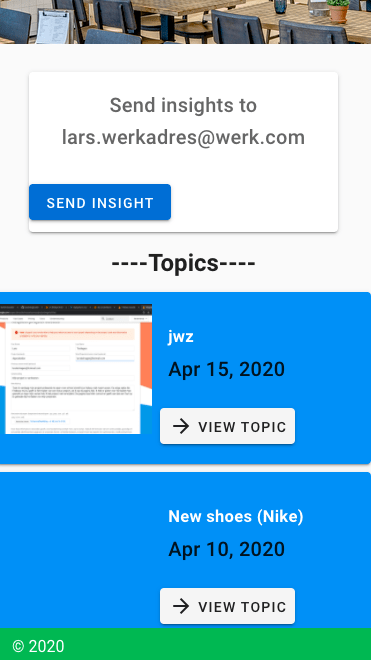
When the meetups (topics) are loaded, I immediately turn them around so the newest ones are displayed on top. This way the topics are displayed the right way on the home page as well, as can been seen in the picture below.
Tester two (administrative worker) Little experienced with technology
Register a new account: succeeded
Send insights: succeeded – She noticed that she could send an insight via the indicated button on the home screen. She also saw which email adres to use to send the insight too. The link to microsoft outlook also was clear for her, she could have logged into to her email adres, but for testing purposes she didn’t).
Make a topic: Succeeded – She went to the topics menu by clicking on the tekst ‘topics’ on the home page. She succeeded in making a topic, but she must select an image in order to post the topic.
Change name and date of the topic: Succeeded – She could change the name and topic. The reply button is visible, but not useable.
Can you delete the old event and make a new one: Succeeded – She can delete the old event and the new event is displayed. This stays when I asked her to refresh the page.
Do you have any other feedback on the app?: How do I know what the homepage is? Maybe put a home icon or change the name from ‘AllShared’ to ‘Homepage Allshared’
Tester three (flight attendant) Badly experienced with technology
Register a new account: Succeeded – She tried to make an account in the login page but this is the default page where you start when opening the app. Eventually she could login making an account.
Send insights: Succeeded – She noticed that she could send an insight via the indicated button on the home screen. She also saw which email adres to use to send the insight too. The link to microsoft outlook also was clear for her, she could have logged into to her email adres, but for testing purposes she didn’t).
Make a topic: Succeeded – When you scroll down on the homepage site you can’t see the drawer. Because of this she accidentally clicked on the home page of google and went back to the google starting page. She had a comment that she didn’t have any kind of feedback when she could post the topic. When you didn’t selected a photo, you can’t send the topic.
Change name and date of the topic: Succeeded – She immediately knew which button to press everything is clear about this step.
Can you delete the old event and make a new one: Succeeded – She held down one of the events, this doesn’t work if you want to select an old event, but eventually she just tried to click ones. Clicking ones is the only way to select an event.
Do you have any other feedback on the app?: Is the e-mail adres, which is indicated on the main page, the person of contact for everyone in the company? Answer: The company can change this text to their liking. I haven’t made an admin account who can change the text when just logging in with their account in my app. If the indicated e-mail account is to be changed it has to go via a programmer who can update the app for the company.
Fault
When making this blogpost it didn’t save the right way the first time I made it. This resulted in losing a lot of data. Luckily most of important testing results where still there and I remembered some of it. This happens sometimes when opening the blog after it has lost connection. This is why I almost always save my progress after just making a few alterations in the blog. But sadly I forgot to do that this time. This is also what I have learn during programming of the app. Save after almost every step, otherwise I can lose some code or I can’t track the new error that just has popt up
Reflection
I liked doing this part of my project. Working with actual users instead of constantly looking for technical coding solutions on the internet. I learned some testing methods during the making of the app in the lectures of ‘creating a mobile app’ in my minor. I found it fairly easy to do this step. Most of the feedback I have gotten was to be expected, but I was quite surprised what kind of comments I got on my app. The test users where quit enthusiastic about the idea and the actual app in general. The functions that I have worked out could be used most of them said.
Time spend on testing the app:
- Making the setup: questions and volunteers: 3 hours
- Volunteer one: 1 hour
- Finding solutions for the indicated problems and implementing them: 3 hours
- Volunteer two: 1 hour
- volunteer three: 1 hour
- Repairing lost data: 2 hours
- Writing the blogpost: 3 hours
 Employee satisfaction