Before I began the submitting of insights part of my project, I wanted to store my files before I lost everything by accident. I did this via DropBox. The other storing choice I considered using for storing my code files was Github. I checked out the Github method but it comes down to the same concept as dropbox.


Just to be extra safe I put a copy of the app into the cloud. At first I only saved it onto my harddrive.
Submitting insights
To start simply, I just want to create an Outlook like layout where e-mails could be send. So why not add a link to outlook? This way the submitting process gos via outlook and you could use the same work E-mail adres as you are used to. Employees do need to know where they send the submissions to, so I thought of displaying this in the first page that you encounter when choosing to send an insight. The person within the company which is responsible for replying and using your feedback could be found on this page and a button which serves as a link to your e-mail account. This wil result into an extra action. The action list:
- Press the insight button on the home page or in the drawer of the app;
- Copy the e-mail that is displayed on the insights page;
- Press the button which brings you to your e-mail;
- Send an insight on your e-mail adres;
- Reopen your app.
The best method is when you have an account which is linked to a specific function within the company, that account is linked with the person which is responsible for managing that specific function. Than you don’t have to fill in the the e-mail adres of the person which is responsible and are instantly send to your e-mail. I tried making a link via the method underneath. Which, eventually, also brings you to your Outlook account. But lets you fill in to which e-mail adres it is send to. This didn’t worked out for me because it costs money. I tried to find variants which are free and efficient but didn’t found any other solution which is possible with my skills.
With the picture below I indicated the change from my original plan. At first I thought of a pre-designed questionary where deferent questions would be answered in order for the manager to understand the insight as good as possible.
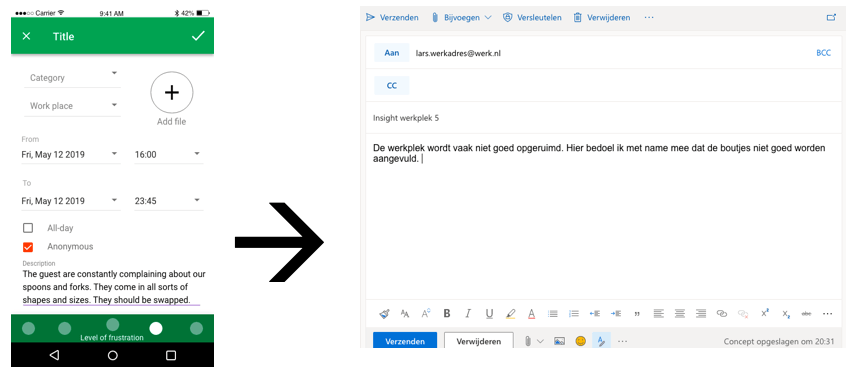
The video below shows how I implemented the idea’s of the submitting process into the app.
Feedback to the user
After defining how to create the submitting proces, the only problem I faced was how to constantly keep the user updated on the situation of the submission. The picture below shows how I initially wanted to fill this part in.

I looked on youtube and on different forums how to implement certain information form your e-mail inbox into the app. Sadly i didn’t found a way the e-mail information. This ment that I couldn’t display any reactions on e-mails in my app. The user has to quit the app and go to their e-mail account to check if anyone has reacted on the insight.
To get the user to see the progress on the problem which the insight is given from, I want to show this in the main menu. I tried using the firebase option with help of Vuex, but that also ment I needed to change the way of sending the submissions and could not do this via outlook. I tried making a pre-made form with help of the youtube playlist underneath.
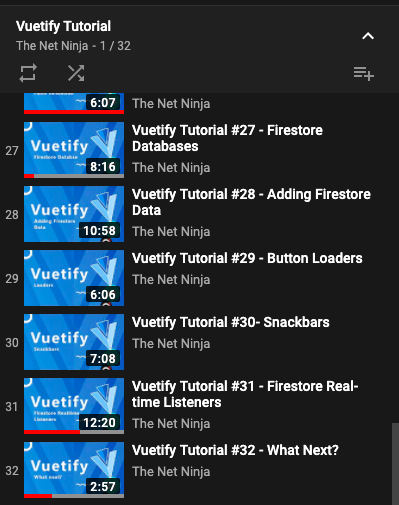
I only watched the last few of this serie because I already had experience with the first few steps.
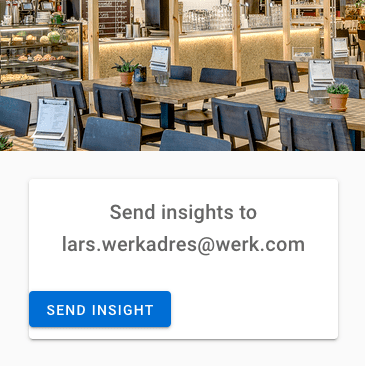
Eventually I choose to just keep the link to outlook. To see replies on insights, the user must log back into the outlook e-mail adres. The picture underneath shows how the link is indicated on the main menu.
Reflection
In this part of my project I did a lot of background work which resulted in little. I only added a few buttons which links the app to your e-mail adres. This was quite a bummer for me since I imagent more user feedback. I noticed that much of the previous experience was hard to bring back since I left the project for a few weeks. I was relieved I saved my code on the cloud and dropbox when I got back to programming. The main skills are of HTML and javascript are still there, but when it comes down to working with CSS and firebase I still need to do some research. Also working with Vuetify comes with a different coding environment this is something I almost forgot when beginning to work on the project again.
Time spend on ‘submitting insights’:
- Learning more about Github and dropbox: 1,5 hours
- Using dropbox and saving files: 0,5 hour
- Finding solutions to submit insights: 4 hours
- Creating a link and trying out the ‘maltoui’ link: 2 hours
- Implementing the link to the e-mail adres: 0,5 hour
- Finding an solution for user feedback: 3 hours
- Writing this blogpost (and making videos): 2 hours
- Trying the firebase option: 1,5 hours
 Employee satisfaction