How might we create an environment where employees can give there opinion to the employer in an easy (and quick) way? I tried to find a solution by a Brainwriting session.
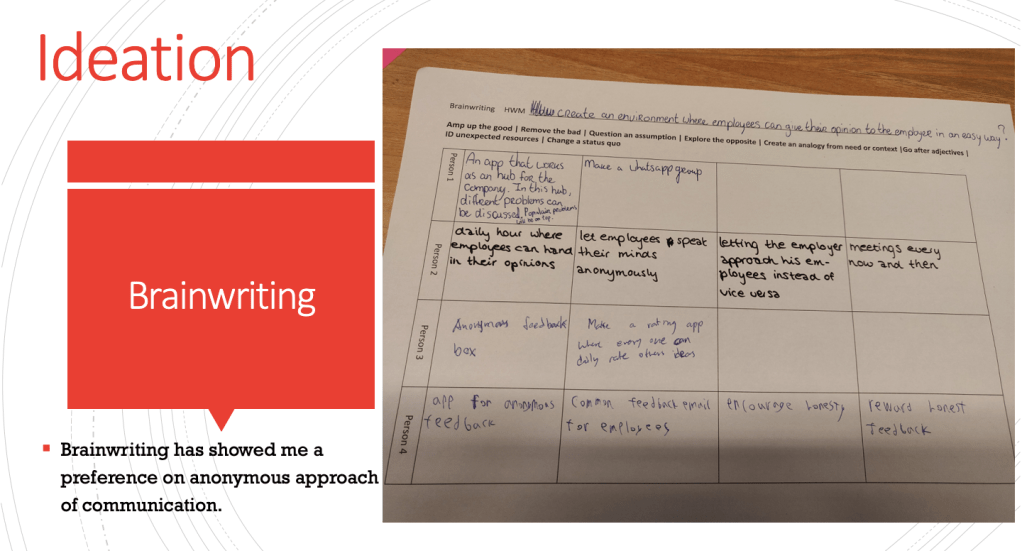
Solutions like this are not strange to me. I during my trainee time at Gazelle. We held a daily STIP meeting. This meeting is almost the same as the mentioned daily hour and the meetings every now and then. Letting the employee approach the employees is key for getting important information. When the employee noticed something wrong, most of the time his team manager got the information from him. He would put the information into a google form on his tablet our computer. I worked on perfecting the Google form during my time at the Quality Department of Gazelle. I created different Google forms for different production departments. When an employee noticed something wrong, they needed to fill in their department, the category of the fault (damaged or wrong design for example) and their insight on where and how it went wrong. I would like to create an app which can be used for this kind of problem solving and with it increase employee satisfaction by working together.
Functional demands of the app
Must be able to log into two different app layouts à managers/supervisors and employees. (Conditional rendering).
Must be able to send messengers between accounts.
Events
- Must be able to post new events (only visible to yourself).
- Must be able to see events within the company (created by managers).
- Should start with an overview of all events (yours and the ones created by admins).
- Preferably be able to sync with Google Calendar.
Home screen
- Must be able to access events, submissions and topics.
- Preferably be able to add new events, submissions and topics.
Submissions (general)
- Must be able to receive reactions on submissions from admin accounts (created by managers).
- Must be able to send submissions to admin accounts.
- Must be able to look into old submissions.
- Should be able to say when a submitted issue has been solved (according to the user).
- Should be able to search into your submission overview.
- Preferably be able to contact managers personally and supervisors about a problem.
Submission (content)
- Must add title and explanation for the issue.
- Should be able to choose which category (for example: Tools, colleague’s or product), so the admin can connect them to certain departments within the company.
- Should be able to add photos.
- Preferably be able to say which how frustration the issue is (by adding a level of frustration for example: 1-5).
Topics
- Must be able to add topics.
- Must be able to see topics within the company (created by managers and employees).
- Preferably be able to define the importance of a topic by the creator of the topic.
Machine connection
To create a more powerful tool of employee satisfaction I did some more research. The link below brings you to one of the most interesting sources i used.

The idea of a visual status of the well doing of the employee satisfaction within the company from a physical machine is maybe a little weird, but it serves a key function. By having a small setup on a place where most of the employee come through daily, it will keep people daily up-to-date with the status of their unsolved and solved problems within the company. They contribute by sending insights, which helps solve certain problems. To create this machine, a few questions have to be answered:
- How will the machine look like?
- What information does it receive?
- What information does it display?
- How does it receive? (bluetooth)
- How does it display? (led-lights)
In the first post I already introduced the idea of the machine as a machine which can turn red, orange or green depending on the amount of insights and problems that are left to solve. If you make it visual for the user, it will trigger the user much faster. This idea will be further explained in the design phase of the project.
Time spend for documenting: 5 hours
- Time for adding functional demands of the app: 1 hour
- Summery of important ideation previously done: 0,5 hour
- Time for sourcing powerful ways of displaying information to users (employees and employers): 3 hour
- explanation of the machine connection: 0,5 hour
 Employee satisfaction